
How to Sell Sarees Online: 10 Smart Product Listing Tips
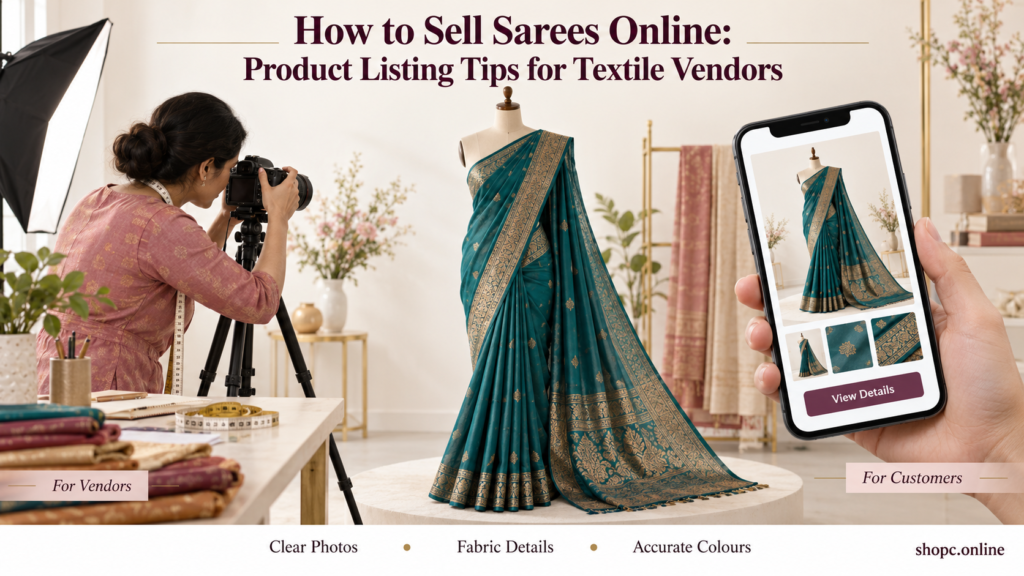
How to Sell Sarees Online: Product Listing Tips for Textile Vendors
Learning how to sell sarees online starts with understanding what customers miss when they cannot visit your shop. They cannot feel the fabric, unfold the pallu or hold the saree against themselves to judge the colour.
Your product listing needs to answer those questions.
For textile vendors in Salem, Chennai, Coimbatore and other parts of Tamil Nadu, a useful listing brings the shop-counter conversation onto the screen. It explains the fabric, shows the design clearly and tells buyers exactly what they will receive.
Whether you are preparing your first collection for ShopC or improving existing listings, these ten tips will help you present sarees more clearly and support confident purchases.
How to Sell Sarees Online with Better Product Listings
1. Write a Title That Identifies the Saree
A title should help customers recognise the product quickly.
“Beautiful Latest Saree” gives very little information. A title such as “Maroon Cotton Saree with Printed Floral Border” explains the colour, fabric and design.
Use this simple structure:
Colour + verified fabric + saree + main design feature
Examples include:
- Blue Cotton Saree with Contrast Border.
- Green Silk-Blend Saree with Woven Motifs.
- Pink Floral Printed Saree with Unstitched Blouse Piece.
Use these descriptions only when they match the actual product.
Avoid filling the title with repeated phrases such as “best saree,” “cheap saree” and “latest saree online.” Customers need a clear product name, not a collection of search terms.
2. Describe the Fabric Accurately
Fabric is one of the most important details in a saree listing.
State the verified fibre composition where available. If the saree is a blend, describe it as a blend. If you do not know the composition, check with your supplier before publishing a specific claim.
Style names alone may not fully explain the material. For example, a name describing a fabric’s appearance or construction should not replace information about its fibre content.
Also describe practical characteristics you have checked:
- Does the saree feel soft or crisp?
- Is it light or comparatively heavy?
- Does it have a matte finish or visible sheen?
- Is the fabric sheer?
- Does it hold structured pleats or fall loosely?
Avoid unsupported claims such as “pure silk,” “handloom,” “colourfast” or “shrink-proof.”
If you mention a certification, weaving method or place of origin, make sure the claim applies to that specific saree and that you can support it.
3. Give Separate Saree and Blouse Measurements
“Standard size” is not enough information for every buyer.
Measure the saree and state the length and width clearly. If a blouse piece is included, provide its length separately.
Explain whether the blouse piece is:
- Attached to the saree.
- Supplied separately.
- Unstitched.
- Not included.
Be especially clear about whether the stated total length includes the blouse piece.
For example, a hypothetical listing might say:
Saree length: 5.5 metres, excluding an attached 0.8-metre unstitched blouse piece.
Only use those measurements if they match the item you have checked.
Also mention whether fall stitching, pico edging or other finishing is included. A blouse worn by a model should not be assumed to come with the saree.
4. Photograph the Body, Border, Pallu and Blouse Piece
One folded photograph rarely answers every question.
Create a photo set that shows the saree as a complete product and in useful detail.
| Photograph | What it helps customers check |
|---|---|
| Full draped or extended view | Overall design and colour placement |
| Main body close-up | Print, weave and texture |
| Border close-up | Pattern, finish and relative width |
| Open pallu | Design that may be hidden in a folded image |
| Blouse piece | Colour, pattern and what is included |
| Reverse-side detail, where useful | Construction and finishing |
Photograph the actual item or an accurately representative piece of the same variant. Check new batches for visible differences.
Use soft, even lighting and a simple background. Avoid filters that change colours or make the fabric appear more glossy than it is.
A brief draping video can also help customers understand movement and fall, if the platform supports video.
5. Explain Colour and Design Without Exaggeration
Colour names should help buyers picture the saree.
Use descriptions such as “deep maroon body with a mustard border” instead of simply “multicolour.” If the blouse piece contrasts with the saree, identify its colour separately.
Photograph every available colour rather than showing several variants under one unrelated image.
You can include a reasonable note:
“Colours may appear slightly different depending on lighting and screen settings.”
However, that note should accompany accurate photographs. It does not replace them.
Describe decorative details precisely. A gold-coloured border should not be described as containing gold unless that claim is verified.
6. Write a Description That Answers Buying Questions
A good saree product description does not need elaborate language. It needs useful information.
Start with a short overview, then provide specifications.
A customer may want to know:
- Is this suitable for everyday wear or a more dressed-up occasion?
- Is the material sheer?
- Is a blouse piece included?
- Is the blouse shown in the photograph supplied?
- Are the motifs printed, woven or embroidered?
- What care does the saree need?
Describe what you can observe and verify. Avoid giving every saree the same description.
Google’s guidance on helpful, reliable content encourages content that serves readers. For saree listings, answering real purchase questions is a practical way to apply that principle.
7. Show the Price and Package Contents Clearly
Customers should understand what the displayed price covers.
State whether the package contains one saree, a saree with an unstitched blouse piece or another clearly defined combination.
If jewellery, belts, stitched blouses or other styling accessories appear in the photographs but are not included, say so.
Before setting the price, calculate your product cost, packaging, platform charges, delivery contribution and other relevant expenses. Confirm current marketplace charges rather than assuming a fixed rate.
Avoid misleading discounts or unsupported “lowest price” claims. A clear price and an accurate description give customers a sound basis for comparing products.
8. Organise Variants and Keep Stock Updated
Assign a separate stock code to each colour or design variant.
For example:
| Stock code | Variant | Available units |
|---|---|---|
| SAR-MAR-01 | Maroon with mustard border | 3 |
| SAR-BLU-02 | Blue with silver-tone border | 5 |
| SAR-GRN-03 | Green with printed border | 2 |
These are sample inventory entries, not actual ShopC products.
If you sell the same stock in a physical shop, update online availability after in-store sales. Make sure each selected variant displays the correct photograph and description.
Never substitute a different colour or design without the customer’s agreement.
Accurate stock information helps prevent cancellations and disappointment.
9. Add Care, Dispatch and Return Information
Care instructions should match the manufacturer’s guidance and the actual fabric. Do not use the same washing advice for every saree.
Mention any verified special handling requirements, and avoid promising that a saree will not shrink or release colour unless you can substantiate that claim.
Explain when the item is expected to be ready for dispatch. Dispatch time and delivery time are different, so do not confuse them.
Customers can review ShopC’s shipping policy for delivery information. Availability depends on the delivery location and serving vendor.
Also link to the applicable returns and refunds policy. ShopC states that eligibility can vary by product and vendor.
If blouse cutting, stitching or another alteration affects return eligibility under the applicable policy, make that clear before purchase.
10. Review the Listing on a Mobile Screen
Before publishing, open the listing on a phone.
Check whether customers can read the specifications, inspect the photos and find the price without confusion.
Review these final details:
- Does the title match the photographs?
- Is the fabric description consistent throughout?
- Are the saree and blouse measurements separate?
- Does the selected colour show the correct image?
- Are package contents clear?
- Are stock, price and delivery details current?
- Can the buyer find return information?
When learning how to sell sarees online, this final review is easy to overlook. It is also a useful opportunity to catch mistakes before they become customer complaints.
Sample Saree Product Listing
The following is a fictional example showing how to organise a listing. Replace every detail with information verified for your own product.
Maroon Cotton Saree with Mustard Printed Border
This maroon cotton saree has a mustard printed border and a patterned pallu. It comes with an attached, unstitched blouse piece. The photographs show the body, border, pallu and blouse fabric separately so you can review the design before ordering.
| Product detail | Example information |
|---|---|
| Fabric | Cotton, verified for this example |
| Main colour | Maroon |
| Border colour | Mustard |
| Design | Printed border and patterned pallu |
| Saree length | 5.5 metres, excluding blouse piece |
| Saree width | 1.12 metres |
| Blouse piece | Attached, unstitched, 0.8 metre |
| Package contents | One saree with attached blouse piece |
| Fall and pico | Not included |
| Styling accessories | Not included |
Before publishing a real listing, add the verified care instructions, price, stock availability and applicable delivery and return details.
What Customers Should Check Before Buying a Saree Online
A detailed listing helps, but buyers should still review the information that matters to their purchase.
Check the Fabric, Not Just the Product Name
Read the composition and description. If a fabric claim is unclear, ask the seller before placing the order.
Confirm the Blouse Details
Check whether a blouse piece is included, whether it is stitched and whether its measurements suit your needs. Do not assume the model’s blouse is supplied.
Look Beyond the Main Photograph
Inspect the pallu, border and fabric close-ups. If an important area is missing, request a clearer image where possible.
Check Timing for Special Occasions
If you need the saree for a wedding or family function, allow time for delivery and any tailoring. Review the order-specific delivery estimate before paying.
Read the Return Conditions
Keep the order confirmation. Inspect the item when it arrives, and review the applicable conditions before washing, stitching or cutting an attached blouse piece.
For questions about an order or the platform, use the ShopC contact page.
Common Saree Listing Mistakes to Avoid
| Mistake | Better approach |
|---|---|
| Calling every fabric “silk” | State the verified fibre composition or blend. |
| Using only a folded image | Add pallu, border, blouse and full-view photographs. |
| Writing “blouse included” without details | Specify attached or separate, stitched or unstitched, and length. |
| Copying supplier text without checking | Verify it against the actual stock. |
| Reusing one image for different colours | Show each variant accurately. |
| Repeating search terms in every sentence | Use a descriptive title and useful specifications. |
| Leaving sold items available | Update inventory across shop and online sales. |
| Promising universal returns | Explain the policy applicable to that item. |
Getting Started as a Textile Vendor on ShopC
Prepare a small collection of accurately described sarees before expanding your catalogue.
For each product, gather measurements, fabric information, photographs, price and stock details. Then review the ShopC vendor registration page and confirm the current seller requirements, fees and payout terms.
Customers can explore ShopC’s clothing and apparel section and inspect individual listings before ordering.
Frequently Asked Questions
How Do I Sell Sarees Online as a Beginner?
Start with a manageable collection. Verify the fabric and measurements, photograph each design, calculate your costs and review marketplace terms before listing products.
What Should a Saree Product Description Include?
Include fabric, colour, design, saree measurements, blouse-piece details, package contents, care instructions and relevant finishing information. Make delivery and return conditions easy to find.
How Many Photographs Should I Add?
Use enough images to show the complete saree and its important details. A useful starting set includes the full view, body, border, pallu and blouse piece.
Can I Use Supplier Photographs?
Only use photographs you have permission to use and that accurately represent the item being sold. Check the actual stock for differences in colour, design and included pieces.
Should I Use Tamil in Saree Listings?
Tamil explanations can help Tamil-speaking customers where the platform supports them. Keep English and Tamil measurements, fabric descriptions and package details consistent.
Does a Better Listing Guarantee Sales?
No. Demand, pricing, availability, visibility and service also affect sales. A clear listing helps customers make informed decisions and can reduce avoidable misunderstandings.
Help Customers Choose the Right Saree
Knowing how to sell sarees online means presenting the details a customer would normally check in your shop. Show the fabric clearly, measure carefully and explain what comes in the package.
Begin with a collection you can manage accurately, then improve your listings using genuine customer questions.
For textile vendors: Review ShopC’s seller registration requirements.
For customers: Browse ShopC and compare product details before choosing your next saree.
More from the blog

Selling Packaged Food Online: 10 Essential Seller Checks
Selling packaged food online? Check FSSAI requirements, labels, allergens, shelf life, packaging and…
View more →
Sell Home Décor Online: 10 Smart Listing Tips
Sell home décor online with clear photos, accurate dimensions and helpful product details. A practic…
View more →
How to Sell Clothing Online: 10 Smart Listing Tips
Learn how to sell clothing online with accurate size charts, clear photos and useful product details…
View more →