
Protect Phone in Rain: Simple Monsoon Phone Care Tips at Home

The northeast monsoon brings cool evenings, hot bajji and sudden heavy showers across Tamil Nadu. If you travel by bike, bus or on foot, learning how to protect phone in rain is a small habit that saves a lot of worry. This guide covers simple rain covers, what to do if your phone gets wet, how to stay charged during power cuts, and easy ways to use your phone comfortably at home through the rainy weeks.
Table of Contents
Why you should protect phone in rain every day
Your phone holds your UPI apps, bus tickets, office messages and family photos. A few drops on the screen may not look serious, but water can slip into the charging port, the speaker grill and the gaps around the buttons.
Many phones say they are “water resistant”. This usually means some protection against splashes, not long exposure to heavy rain. So it is wise to treat every phone as if it needs care.
A little planning helps you protect phone in rain without changing your daily routine:
- Keep a rain pouch or cover in your bag or bike box all season.
- Do not take calls in open rain; step under a shop shade or bus stop first.
- Avoid charging the phone when the port or your hands are wet.
- Keep a small cotton cloth handy to wipe the phone dry.

Choosing a mobile rain cover
A mobile rain cover is a simple clear pouch that seals your phone away from rain. It is useful for two-wheeler riders, students walking to college, and anyone who uses maps on the move.
What to check before you buy
- Size: Measure your phone with its back case on. The pouch should fit with a little space, not stretched tight.
- Seal type: Look at how the opening closes, such as a zip lock or press seal. Read the description carefully.
- Clear window: Many families like pouches where touch still works through the plastic, but check the listing or ask the seller.
- Strap or hook: A neck strap makes it easy to carry.
- Pack size: A pack of two is handy, one for you and one for a family member.
On ShopC, read the product page and the seller’s notes for size details. Our guide on checking product quality online has more simple tips.
Using the cover properly
Close the seal fully before you step out. After use, wipe the pouch and let it air dry before folding it away. Never put a damp phone inside a pouch, because trapped moisture can do more harm than a few raindrops.
What to do if your phone gets wet
A phone can slip into a puddle or get soaked in a sudden downpour. Stay calm and follow these common-sense steps:
- Take the phone out of the water quickly and switch it off.
- Remove the back case and, if possible, the SIM tray.
- Wipe the outside gently with a soft, dry cotton cloth.
- Hold the phone with the ports facing down so water can drain out.
- Leave it in a dry, airy place under a fan to dry naturally.
- Wait a good while before switching it on. Do not charge it until it is fully dry.
Mistakes to avoid
- Do not use a hair dryer on high heat or keep the phone in direct sun.
- Do not shake the phone hard, as it may push water deeper inside.
- Many people put a wet phone in a bowl of raw rice. This is a popular habit, but it is not a proven fix, and rice dust can get into the ports. Open air drying is a safer first step.
If the phone still behaves oddly after drying, take it to a trusted service centre.
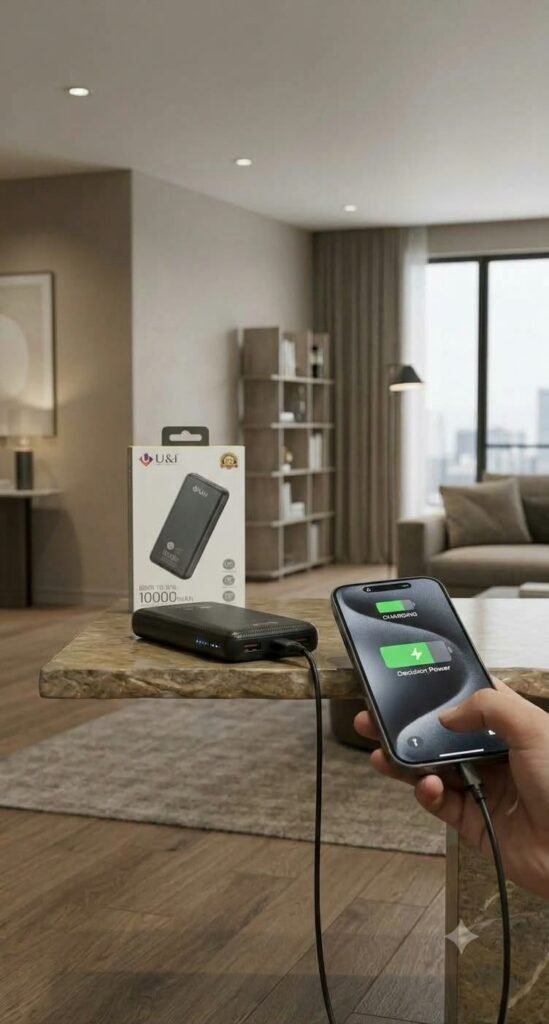
Monsoon phone care during power cuts
Rain and wind often bring power cuts. Good monsoon phone care means planning for this too. A charged power bank keeps your phone ready for important calls, online classes and checking on family members.
Simple power bank habits:
- Charge your power bank fully whenever there is a weather warning.
- Keep it in a dry place, away from windows that let in spray.
- Use a cable that fits your phone well.
- Do not leave the power bank charging overnight on a bed or pillow.
- Check its capacity in the product description so you know what to expect.
To save battery in a power cut, lower screen brightness, close apps you are not using, and switch on battery saver mode.
Making indoor phone use easy on rainy days
On rainy days, families spend more time at home. Children may have online classes, elders make long video calls to relatives, and many people cook while following recipe videos. Holding the phone for a long time is tiring and increases the chance of dropping it.
A mobile stand solves this simply. Place the phone at eye level for video calls, so your neck and hands stay relaxed. In the kitchen, keep the stand away from the sink and stove, where splashes and steam can reach the phone.
You can find rain covers, power banks and stands in the mobile accessories section or the wider gadgets category from local sellers on ShopC.
A quick monsoon checklist
Keep this list in your notes app before the heavy rain weeks:
- Rain pouch packed in your bag or bike box
- Power bank charged, with its cable
- Soft cotton cloth for wiping the phone
- Phone stand set up for calls and classes
- Photos and contacts backed up
- Back case checked for cracks
Backing up photos and contacts is easy to forget, but it keeps your memories safe even if the phone has trouble. Together, these habits make it much easier to protect phone in rain all season.

Frequently asked questions
Here are quick answers to common questions about phone care in the rainy season.
Will a mobile rain cover let me use the touch screen?
Many clear pouches allow basic touch use through the plastic, but this varies. Check the product description and ask the seller before you buy.
Is it safe to put a wet phone in rice?
It is a common habit but not a proven fix, and rice dust can enter the ports. Switch the phone off, wipe it and let it air dry instead.
Can I charge my phone with a power bank during rain?
Yes, as long as you are indoors, your hands are dry and both devices are kept away from water.
More from the blog
Cotton Saree Care in Monsoon: Wash, Dry and Store the Right Way
Simple cotton saree care tips for the rainy season: gentle washing, how to dry cotton sarees indoors…
View more →
Herbal Tea for Rainy Days: Warm Drinks for Monsoon Evenings
Herbal tea for rainy days: how to brew hibiscus tea, blue pea tea and sukku malli coffee at home, wi…
View more →
Kanji Mix for Breakfast: Easy Traditional Porridge Ideas
Kanji mix for breakfast made simple: poongar, rathasali and multigrain porridge mixes, sweet and sav…
View more →